Register • Donate • Login

Makes you a wonderful human being.

Welcome Guest Active Topics | Members

Star Wars Miniatures Plugin for Magic Set Editor -- UPDATED 11/13/26 -- Options
Jester252
Posted: Tuesday, November 10, 2026 12:10:14 PM
Rank: Ewok
Groups: Member

Joined: 11/10/2026
Posts: 2

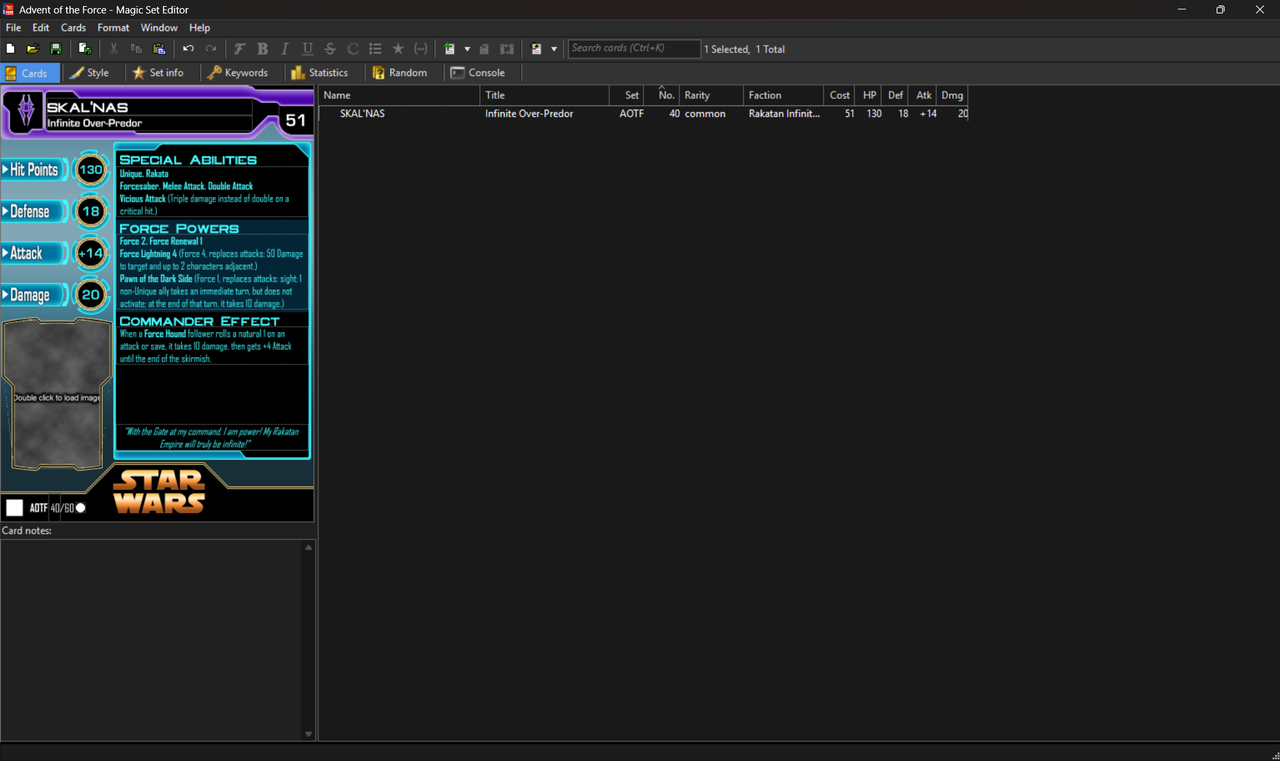
A preview of the Editor's UI.


Some may be familiar with Magic Set Editor: A program whose purpose was to allow fans to make their own Magic the Gathering cards. Thing is, much of it is open source, and some folks have made plugins for the program for other card games. Upon noticing that there was no such plugin for Star Wars Miniatures, and further finding that SWM custom statblocks were still left to just a few pngs, a generic image editor, and a dream, I set out to make something far more helpful to this community. Thus, I began work on this plugin.

The goal of this project was to make SWM custom cards/statblocks more accessible to the community at large. And even better: you can edit everything I've done here with your own code. Making a stat card takes mere seconds, and a single .mse-set file can hold numerous cards for you to jump between for easy editing.

If that interests you (and if you've ever tried to make SWM customs, it rightly should), you can download it from my Google Drive here. To use the program, simply download the linked folder and run the executable.

Features and potential Future Updates:

- I currently have three templates in place. I'd like to add even more for further customizability in the future. Also, none of these have the customizable back faces as of yet. To be added.

- I am fairly certain I have included most of the keywords made by WotC for this game as auto-fillable (the documentation for this game is... inefficient at best, so I could very well have missed some things). I do not yet have all of the V-set keywords. If anyone has a glossary of those to share so that I don't have to browse slowly through a dozen or so pdfs to find each one, you'd be my absolute hero.

- I've also added a small number of custom keywords of my own that were not originally included by WotC that I personally felt helped fill in some blanks. There's also a toggle to allow three different reminder text modes.

- There are 25 different factions/symbols included in this template. Some of the original WotC factions have had their symbols changed to be more era or thematically appropriate. However, as symbology in Star Wars is nearly impossible to get perfect (especially with some symbols for the same faction changing depending on whether you are looking at legends or canon; i've done my best to strike a healthy balance between both), I have included the .psd files needed for users to design their own. One of my future goals is to include some easier-to-modify custom slots.

- I've done a fair amount of testing, but I can't claim to have tried every possible option or combination thereof. If any bugs or errors arise, or if anything is noticed as missing, please feel free to notify me here and I'll aim to fix it to the best of my ability. Suggestions and such are also welcome.

- Last thing I'd like to do is maybe eventually build some appropriate documentation for this plugin, but that's a distant goal for now.


In all, I know that everything won't necessarily be to everyone's liking just yet, but hopefully this is a decent first step toward making customs just a bit more accessible. I'll do my best to be responsive and provide updates in reasonable timeframes, but real life can be unpredictable, so I ask for patience if I'm not the swiftest in answering or helping.

Here's a small batch of quickly-thrown-together examples using the plugin:
"Backstabber", Black Squadron Wingman
"Mauler" Mithel, Black Squadron Lieutenant
Nobot, Haunted Droid
Skal'nas, Infinite Over-Predor
Jester252
Posted: Friday, November 13, 2026 4:51:26 PM
Rank: Ewok
Groups: Member

Joined: 11/10/2026
Posts: 2
UPDATE 11/13/26

Card Examples:
B2EMO, Faithful Groundmech
The Ronin, Scourge of the Sith
R5-D56, Combat-Ready Astromech

Changelog:
IMPORTANT NOTE: AFTER UPDATING AND LOADING A PREVIOUSLY-MADE SET, THE CONSOLE MAY SHOW A YELLOW TRIANGLE WITH AN EXCLAMATION POINT. ATTEMPT TO SAVE AND RELOAD THE EDITOR. MOST OF THE TIME, THIS WILL FIX THE ISSUE. IF IT DOES NOT, PLEASE REACH OUT AND CONTACT ME.

### Keywords & Reminder Text ###
- Updated reminder text to have more concise text where possible.
- Corrected incorrect reminder text.
- Added a toggle for keyword definitions: "Wizards of the Coast" provides reminder text as defined by WotC, "SWMG Errata" provides reminder text with balance updates provided by the SWM community, and "Jester's Reworks" keeps the changes from SWMG Errata but also adjusts a few keywords (most notably defensive force powers and on occasion their non-force power counterparts) such that none of these abilities are objectively less useful simply due to other's existence.
- Removed any keywords that had varying levels of customizable reminder text. After experimenting, it was found to be more efficient to allow the reminder text for those specific keywords to be fully written from scratch.
- Added a few keywords introduced in the V-Sets. This has not yet been incorporated in an exhaustive manner, as I haven't found a proper glossary for these, but the process has been started.


### Additional Templates ###
- A template for cards resembling those from WotC's "The Clone Wars" set and beyond has been included.
- A new custom template inspired by the UIs from KotOR, KotOR2, and TOR has been included.


### Bug Fixes ###
- A bug was causing a crash when trying to upload images for set symbols. I have changed the field from "image" to "symbol" (which still supports file uploads) and that seems to have solved the problem.
- Fixed an issue where changing the font size in the abilities box was causing strange sizes for the text box.
- General minor fixes.


### KNOWN BUGS ###
- There are times where exporting a card image renders the "grey box" incorrectly (the one that overlays on part of the ability box when using multiple ability types). The reason for this is still unknown, as I have yet to find a common denominator in when this happens, as certain text combinations will cause the glitch on one card or template, but not another. This is something I am working to find a solution to, but I must first find the cause. Thankfully, this appears to be only visual on exported images, and does not harm the content of the card itself.
- Switching from one card to another within the same set may cause some of the textboxes to jumble or misalign a bit. Simply click on any textbox on the card to force the editor to update and realign the textboxes. I'm not currently certain if it is possible to force this update without direct user input, or if this is just a side effect of using textboxes with script-induced positioning in this editor. This is again, purely a visual bug and does not harm the content of the card.
Users browsing this topic
Guest


Forum Jump
You cannot post new topics in this forum.
You cannot reply to topics in this forum.
You cannot delete your posts in this forum.
You cannot edit your posts in this forum.
You cannot create polls in this forum.
You cannot vote in polls in this forum.

Main Forum RSS : RSS

Bloo Milk Theme Created by shinja
Powered by Yet Another Forum.net.
Copyright © 2003-2006 Yet Another Forum.net. All rights reserved.